Legacy Authentication: Still Microsoft 365's Biggest Risk
Reviewed by Neil Frick — July 2026

▶ Watch the short explainer for this tip
Even with all the sophisticated cyber threats out there, it might surprise you to learn that a fundamental flaw from yesteryear continues to be the biggest security risk for Microsoft 365. We're talking about legacy authentication protocols, and they're a direct pathway for bad actors to compromise your accounts.
These older methods bypass modern security measures, making them an easy target for brute-force attacks and credential stuffing. If you're running a business in Australia, understanding and mitigating this risk isn't just good practice; it's essential for protecting your data and your reputation.
What is Legacy Authentication and Why is it a Problem?
Legacy authentication refers to older, less secure protocols like POP, IMAP, and SMTP that don't support modern security features such as Multi-Factor Authentication (MFA). When these protocols are enabled, they become a weak link, allowing attackers to log in using just a username and password, even if you have MFA enabled for other access methods. It's essentially an open back door to your Microsoft 365 environment, as Microsoft themselves have highlighted. Book a free 15-minute chat with Neil to discuss your specific M365 setup.
The Direct Link to Account Compromise
The Australian Cyber Security Centre (ACSC) regularly identifies credential compromise as a significant vector for cyberattacks, with Business Email Compromise (BEC) being a widespread and costly outcome. Attackers frequently target legacy authentication endpoints because they're easier to exploit using automated tools. Once an account is compromised, they can send fraudulent invoices, redirect payments, or access sensitive information, leading to devastating financial and reputational damage. This isn't theoretical; it's a constant threat.
Blocking Legacy Auth: The Essential Fix
The most effective way to eliminate this risk is to block legacy authentication across your entire Microsoft 365 tenant. Microsoft provides tools like Conditional Access policies to achieve this, ensuring that only modern authentication methods are permitted. This step significantly strengthens your security posture and aligns with the ACSC's advice on implementing strong authentication. Don't leave your business vulnerable, book a free 15-minute audit chat with Neil today.
Beyond Blocking: Your Overall Security Posture
While blocking legacy authentication is crucial, it's part of a broader strategy for Microsoft 365 security. Implementing MFA consistently, regularly reviewing access permissions, and educating your staff on phishing threats are also vital. The ACSC's Essential Eight framework provides an excellent blueprint for securing Australian businesses, with robust authentication being a cornerstone. Neglecting any of these areas can undermine your overall protection.
Legacy authentication is a security blind spot for many Australian businesses using Microsoft 365. Blocking it is a non-negotiable step to protect against account compromise and adhere to best practices. Without this fundamental change, your business remains at significant risk from common cyber threats.
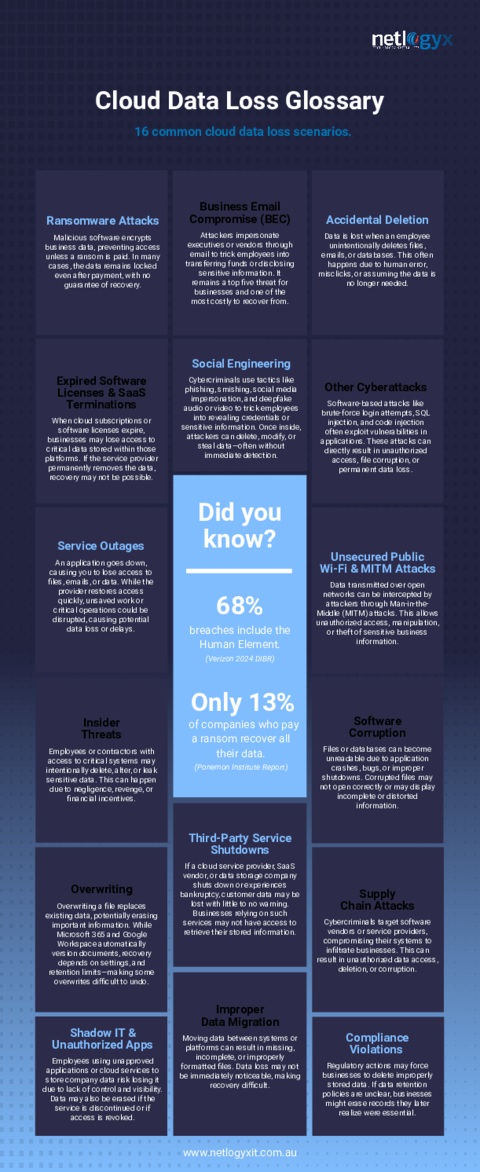
Complimentary guide
Data Loss Glossary: 16 Common Cloud Data Loss Scenarios
Frequently asked questions
- What specifically is 'legacy authentication' in Microsoft 365?
- It refers to older email protocols like POP, IMAP, and SMTP that don't support modern security features. These protocols allow direct access to your mailboxes with just a username and password, bypassing advanced security like MFA.
- If I have MFA enabled, am I still at risk from legacy authentication?
- Yes, incredibly. MFA might be functional for modern application access, but if legacy authentication is still enabled, attackers can use older protocols to bypass your MFA entirely. This creates a critical loophole in your security.
- How do I check if my business is using legacy authentication?
- You can typically check your Microsoft 365 sign-in logs in the Azure Active Directory (now Entra ID) portal, looking for client apps listed as 'Other clients'. A security audit from an expert can confirm this and identify any active legacy connections.
- What's the best way to block legacy authentication for my business?
- The most effective method is through Conditional Access policies in Microsoft Entra ID. This allows you to specifically block sign-ins from clients using legacy authentication protocols, ensuring all access requires modern security standards.
- Will blocking legacy authentication affect my business operations?
- Potentially, yes. Some older applications or devices might rely on these protocols. It's crucial to identify and update or replace any such dependencies before blocking. A proper audit can help manage this transition smoothly.
Sources
Every reference below was link-checked when this article was published.
- 1.Block legacy authentication with Conditional AccessMicrosoft Learn
Want to know where your own tenant stands?
The audit answers these questions with a dated report on your actual settings — a few questions to start, under a minute.